Shopify: Sell. Run a business.
- 4.2
- Rating
- 10.00M
- Installs
- Free
- Price

 Analysis by App-foxy
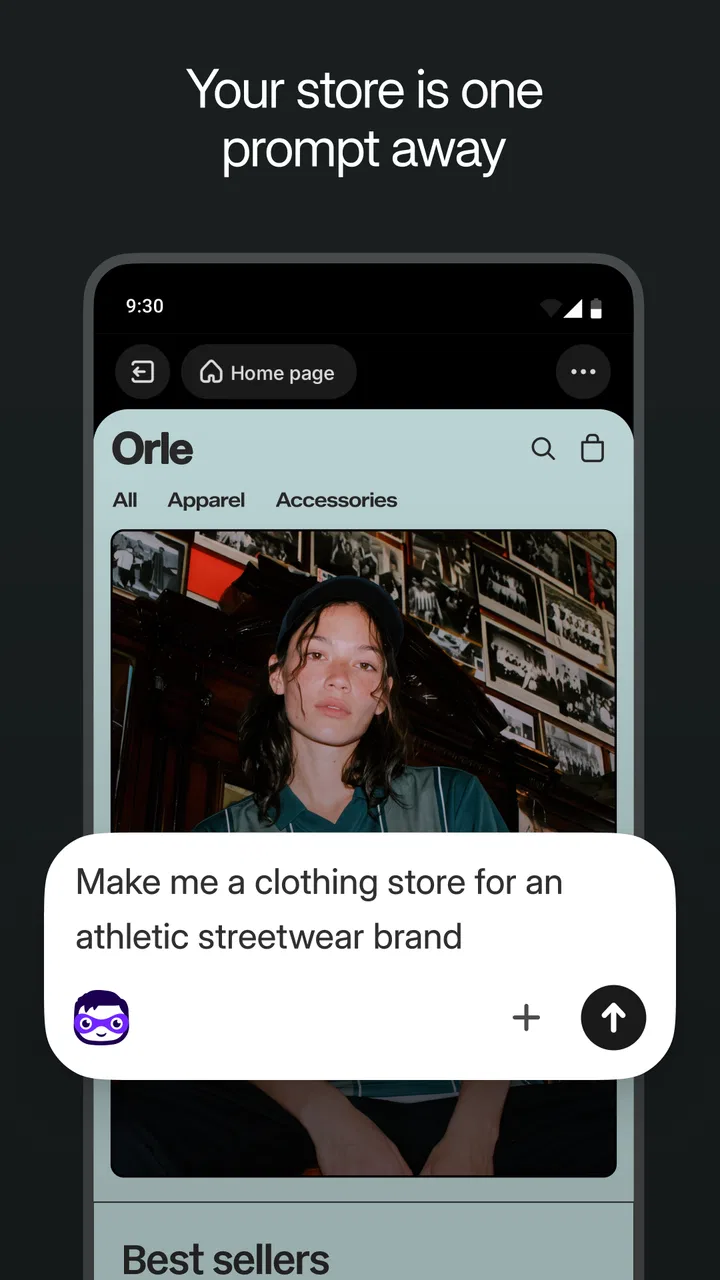
I approached Shopify as a practical mobile workspace rather than simply another shopping tool. It is a business app from Shopify Inc. for people who want to create and manage an online store while keeping important work close at hand. The central capability I focused on is its AI-assisted store-building workflow: instead of starting with an empty storefront and making every decision manually, you can use guided tools to move from an idea toward a working shop much faster.
That promise matters most when you are testing a small product line, starting a side business, or selling without a technical team. I found the app most useful when I treated it as a control center for decisions, not as an automatic replacement for them. It can speed up the repetitive parts of preparing a store, but the quality of the result still depends on the information, product details, images, and business choices I provide.
Building a store with AI without handing over the whole business
The appealing part of the experience is the way AI tools can reduce the blank-page problem. A new seller often knows what they want to sell but has no clear starting point for store wording, product presentation, or the order in which tasks should be completed. Shopify gives that process a more structured path, which is especially helpful on a phone where creating everything from scratch can feel slow.
You May Also Like

 Blood Strike: 2.5 Anniversary
Blood Strike’s Loadouts Turn Every Drop Into a Tactical Gamble
A close look at Blood Strike’s custom loadouts: how fast access to signature weapons reshapes its battle royale rhythm, rewards preparation, and narrows the gap between fights.

 Pandora - Music & Podcasts
Pandora’s Music Is Easy to Start, but Harder to Recover
Pandora’s strength is its low-effort path from a seed to a station. Its weak spot is how much confidence it asks you to place in connection, setup, and quiet recovery.

 8 Ball Pool
8 Ball Pool Is Built on Rivalries, Rematches, and Routine
A close look at the rivalries, rematches, shared routines, and unanswered safety questions that turn a quick pool match into a persistent mobile community.

 Samsung Music
Samsung Music’s Quiet Strength Is Playing What You Already Own
Its reach comes less from spectacle than from dependable access to a personal library. That simplicity is both the app’s strongest retention engine and its ceiling.

 AccuWeather: Weather Radar
AccuWeather Review: A Quick, Clear Forecast for Everyday Decisions
For everyday plans, the best forecast is the one you can understand quickly. AccuWeather makes rain timing, radar, and local conditions easy to act on, with a few trade-offs.

 Hill Climb Racing
Why Hill Climb Racing Still Turns Crashes Into One More Run
A tiny car, a bumpy hill and one more upgrade: Hill Climb Racing keeps resurfacing because its simple chaos makes every near-miss feel personal.
More From Our News Desk



I would not describe the AI as a substitute for knowing your customers. Its real effect is more practical: it helps turn rough ideas into material that you can inspect, edit, and adapt. That distinction is important. Generated text may sound polished while still being too broad, too enthusiastic, or inaccurate for a particular product. I always treated the first result as a draft and checked every claim before using it publicly.
The strongest workflow is to prepare your own product facts first. Have the exact product name, size, materials, intended use, delivery expectations, and any restrictions ready. Then use the assisted tools to shape the presentation. This gives the app useful raw material and prevents a common mistake: allowing attractive wording to hide missing information that a buyer actually needs.
For a small catalog, this can make the early stage feel much less intimidating. I could concentrate on whether the offer made sense instead of spending all my time worrying about how to phrase every section. For a larger catalog, the benefit changes. Speed becomes valuable, but review work also grows, because similar generated descriptions can make different products sound too much alike.
What the mobile workflow feels like
Using Shopify on a phone suits quick checks and short work sessions. I could imagine opening it between appointments to review an order, adjust product information, or check what needs attention next. That convenience is one of the app’s biggest strengths: business tasks do not have to wait until I am back at a desktop computer.
At the same time, a phone is not always the best place for detailed editing. Long descriptions, careful catalog organization, and visual checks benefit from a larger screen. I found it sensible to use the mobile app for monitoring, decisions, and focused updates, while reserving more demanding store preparation for a computer when possible. The app extends the store; it does not make a small screen ideal for every job.
A useful habit is to separate creation from approval. I would first let the assisted workflow produce a draft, then reread it as a customer who knows nothing about the product. Does it explain what the item is? Does it avoid promises the business cannot keep? Does it make clear who should buy it? This second pass is where the seller’s judgment matters most.
The app also makes more sense when I think in terms of a repeatable routine. Instead of opening it randomly, I would use it for a short daily review: check new activity, look for incomplete product details, respond to urgent store tasks, and note anything that needs deeper work later. That approach prevents the mobile interface from becoming a stream of disconnected small edits.
A realistic small-business example
Imagine I am selling handmade stationery as a side project. I have product photos, a few designs, and a rough description, but I do not yet have a consistent way to present each item. I could use Shopify’s assisted tools to create an initial structure, then rewrite the wording so it reflects the actual paper type, dimensions, intended use, and packaging.
Once the store is moving, I would use the phone to make a quick change when a design is temporarily unavailable or when a product detail needs correcting. I would also review activity during the day rather than waiting for an evening desktop session. That matters for a small seller because customer confidence can be affected by outdated information, even when the underlying business is perfectly legitimate.
The important insight is that AI helps most before the store has momentum. It lowers the effort needed to get a coherent first version in front of potential customers. After that, the work becomes more human: learning which descriptions are clear, which products deserve better photos, and which questions buyers keep asking.
Where the assisted tools save time, and where they do not
The time saving is clearest in repetitive drafting. If several products share a format, assisted writing can give me a starting pattern that I can refine. It is also useful when I understand the product well but struggle to make the wording concise. In that situation, the tool helps with presentation rather than business strategy.
It does not remove the need to organize the catalog carefully. A store can be technically active and still feel confusing if product names are inconsistent, images do not match, or important information is buried. I would never publish a generated result without checking it against the actual item. A single incorrect material claim or vague delivery statement can create more work than the original manual edit.
Another trade-off is voice. A new store needs a recognizable personality, especially when it competes with larger sellers. If every description is accepted unchanged, the shop may sound generic. My recommendation is to use the assisted draft for structure, then add details that only the owner would know: why the product was made, how it is used, what makes it different, or what kind of customer it suits.
When Shopify is the right mobile business companion
This app is a strong fit for someone who wants one place to stay connected to a growing store instead of stitching together separate tools for storefront work and day-to-day checks. It is particularly appealing to independent sellers, small teams, and people validating a business idea while still handling another job.
The free starting point also lowers the barrier to experimenting with the workflow. I would still approach that carefully: free access does not mean every business decision becomes free or effortless. A seller should consider the broader operating costs of running a store, including products, fulfillment, customer service, and any services they choose to use around it.
Shopify has broad adoption, with over ten million installs and an average rating of 4.2 from around sixty-five thousand ratings. Those figures suggest that the app has reached a substantial audience, but they should not replace personal testing. A store owner’s needs can be very different from those of someone who only wants a simple selling page.
The app is rated for Everyone, which makes it approachable from an age-rating perspective. It was released in late September 2014 and continues to receive updates; the current version is 10.2609.0 and requires at least iOS 11. I would check device compatibility before planning a store workflow around it, particularly if the phone or tablet is older.
How it compares with simpler alternatives
Compared with a basic marketplace seller app, Shopify feels more like building an owned storefront than merely listing products inside someone else’s catalog. That gives a seller more room to shape the customer experience, but it also means more responsibility. A marketplace can offer an existing audience and a familiar buying process; Shopify is more suitable when I want to develop a distinct store identity and manage the business around it.
Compared with a lightweight website builder, Shopify is more focused on commerce rather than general publishing. That focus is useful when products, orders, and store operations are the main concern. A basic site builder may be easier for a portfolio, newsletter, or informational page, while Shopify makes more sense when selling is the center of the project.
Compared with doing everything manually on a desktop, the mobile app wins on immediacy. I can respond to store activity and make small changes without being tied to a desk. The desktop approach still wins for long editing sessions and careful visual work. For me, the best choice is not either-or: mobile for continuity, larger screens for concentration.
Trade-offs I would consider before committing
The first limitation is that convenience can encourage rushed publishing. AI-generated wording looks finished quickly, but “finished” and “correct” are different things. I would budget time for fact checking, tone adjustments, and a customer-focused review of every important product page.
The second is that a phone-based workflow can become cluttered as the business grows. A few products are easy to review. A broad catalog with frequent changes requires stronger organization and a more deliberate process. If I were managing a complex operation with many staff members or highly specialized requirements, I would evaluate whether the mobile experience alone provides enough control for the work I need to do.
The third trade-off is between speed and individuality. The assisted tools can help a store look presentable quickly, but a memorable shop still needs original photography, accurate product knowledge, and a clear point of view. I would use the automation to remove friction, not to erase the personality that makes the business worth choosing.
There is also a learning curve hidden behind the simple starting point. Building a store may be quick, but running one involves decisions about inventory, customer expectations, presentation, and follow-up. The app can put those activities within reach; it cannot decide which products are profitable, which customers are a good fit, or whether a promise is realistic.
Who gains the most from the app
I would recommend Shopify to a seller who wants to move from an idea to a functioning store without assembling a complicated technical setup first. It is especially useful if you value being able to check the business from a phone and want AI assistance for early drafting and organization.
It is less suitable for someone who only needs a single payment page, a personal portfolio, or a simple classified listing. In those cases, a smaller tool may involve less setup and fewer store-management decisions. I would also hesitate to recommend it as the only workspace for a business that needs intensive catalog editing or highly specialized operational controls on a daily basis.
My practical advice is to start with one small, well-defined collection rather than trying to build a huge store immediately. Use the assisted workflow to create a draft, inspect it carefully, and ask whether a first-time visitor could understand the offer without help. Then use the phone for short maintenance sessions and reserve deeper improvements for a larger screen.
Shopify costs nothing to download, and its business focus makes it more substantial than a quick storefront experiment. In my experience, its best quality is not that AI can create a store without effort; it is that the app gives a new seller a faster starting point and a mobile way to stay involved afterward. Use the automation for momentum, but keep the final judgment human.
That balance is why I see it as a worthwhile choice for independent commerce. It can help a first store feel achievable, support a seller who is often away from a desk, and provide a clearer path from rough product idea to organized presentation. I would choose it when the goal is to build a real selling operation rather than merely publish a page, and I would skip it when a much simpler tool would meet the need with less overhead.
FAQs for Shopify: Sell. Run a business.
01What is Shopify and how does it work?
Shopify is a comprehensive e-commerce platform that allows individuals and businesses to create their own online stores. It provides tools and features to manage products, process payments, and handle shipping. Users can customize their storefronts, integrate with various payment gateways, and track sales and inventory through an intuitive dashboard.
02Is Shopify suitable for beginners?
Yes, Shopify is designed to be user-friendly and accessible for beginners. It offers a variety of templates and drag-and-drop tools that make setting up an online store straightforward. Additionally, Shopify provides a wealth of tutorials and customer support options to guide new users through the process of building and managing their stores.
03What are the costs associated with using Shopify?
Shopify offers several pricing plans to accommodate different needs, starting with the Basic plan. Each plan includes different features and transaction fees, with higher-tier plans offering advanced capabilities like professional reports and international domains. Users should also be aware of potential additional costs for premium themes and third-party app integrations.
04Can Shopify handle in-person sales?
Yes, Shopify supports in-person sales through its Point of Sale (POS) system. This feature allows businesses to sell products in physical locations while keeping inventory and sales data synchronized with their online store. The POS system includes hardware options like card readers and barcode scanners to facilitate smooth in-person transactions.
05What kind of support does Shopify offer?
Shopify provides robust customer support to its users, including 24/7 live chat, email, and phone support. The platform also has a comprehensive help center with guides and FAQs, along with a community forum where users can share experiences and solutions. Additionally, Shopify offers webinars and tutorials to help users maximize their store’s potential.
Pros
- User-friendly interface for beginners.
- Extensive app integrations available.
- 24/7 customer support is reliable.
- Customizable online store themes.
- Secure and reliable payment options.
Cons
- Monthly fees can be high for small businesses.
- Limited free themes available.
- Transaction fees apply without Shopify Payments.
- Complex features may require learning curve.
- Limited customization for checkout process.

Shopify: Sell. Run a business.
Gallery